Token Management
The Workbench uses two kinds of tokens:
- A session token is automatically issued when a user successfully authenticates with a username and password; session tokens are short-lived (24 hours) and are used by interactive users.
- An API token is a long-lived credential created explicitly via the CLI or the Workbench console; used for machine-to-machine access by service accounts or regular users. A service account may only authenticate with a token.
A user who signs in through an identity provider gets a session that lasts as long as the provider's ID token instead, and by default cannot own API tokens at all; see API Tokens and Federated Users.
A token's scope restricts it to a subset of the owning user's permissions. A token without scope restrictions inherits the full access of the owner. A token that a superuser owns is restricted by its scope in the same way as any other token. The system supports three scope types:
- Connection scope limits the token to specific database connections with a
per-connection access level of
readorread_write. A token scope can further restrict access toreadeven when the owning user hasread_writeaccess through group membership. The system always enforces the more restrictive level. - MCP privilege scope limits the token to specific MCP tools.
- Admin permission scope limits the token to specific administrative operations.
Each scope type supports a wildcard option that grants access to all items of that type:
All Connectionsusesconnection_id=0to match every connection the owner can access.All MCP Privilegesusesprivilege_identifier_id=0to match every MCP privilege the owner holds.All Admin Permissionsuses*to match every ADMIN permission the owner holds.
A connection scope either holds the All Connections entry alone or names
particular connections, each one once. The server refuses a connection scope
that combines connection_id=0 with entries for particular connections, that
names a connection more than once, or that names a negative connection ID; the
API answers such a request with 400 Bad Request, and the
-scope-token-connections command fails with an error. In either case the
token's stored scope stays as it was. The server also refuses an admin
permission scope that names an unknown admin permission with
400 Bad Request.
The effective access for a scoped token equals the intersection of the owner's access and the token scope. A superuser holds every privilege, so the intersection for a superuser's token is the token scope itself.
A scope type left empty places no restriction on that type. To lift the
restriction on one type, set that type to its wildcard; to lift every
restriction, clear the token's scope. The PUT /api/v1/rbac/tokens/{id}/scope
endpoint refuses an empty list for any scope type with 400 Bad Request, and
leaves a scope type that the request omits unchanged. The Workbench console
follows the same rule: saving a token with every scope type empty clears the
scope, but emptying one restricted type whilst another stays restricted is
refused.
The connection scope also governs changes to blackouts, blackout schedules,
alert, probe and channel overrides, alert rules, probe configurations,
notification channels and clusters, even though those endpoints are gated on an
admin permission. A token may change an override, a probe configuration or a
cluster membership on a single server only when that connection is in its scope
with read_write access; a change that applies to a cluster, a group or the
whole estate, that alters an alert rule, a global probe configuration or a
notification channel, that creates a connection or a cluster, that creates,
changes or deletes a cluster group, or that alters a cluster's definition or
relationships, needs a connection scope that covers every connection at
read_write. A connection or cluster group that a token creates is owned by
the token's owner. A change to an override, a blackout or a blackout
schedule on a cluster or a group also requires the token's owner to see every
connection in that cluster or group, and a change to an estate-wide blackout
or schedule, an alert rule, a global probe configuration or a notification
channel requires the owner to see every connection, as described in
Administrative Permissions.
A read entry in the connection scope means read-only access to the monitored
server itself, so it still lets a token make changes that only record Workbench
metadata about that server. A token holding a read entry for a connection can
acknowledge or unacknowledge an alert on it, save an analysis of the alert,
and create, change, stop or delete a blackout or blackout schedule on that
server; a blackout that covers a cluster, a group or the whole estate needs the
All Connections entry at either access level. This is intended behaviour.
Alert acknowledgement and analysis need only read access for a user too;
blackout changes also need the manage_blackouts admin permission, for a user
and a token alike.
A token's access also bounds the administrative changes the token can make, so a token can never give a user, a group or another token more than it holds itself. The Bounding What a Token Can Grant section explains the design and lists every request the bound covers.
Holding the manage_token_scopes permission lets a user manage their own
tokens and keep everyone else's in check, but not act through another user's
tokens. A caller who is not a superuser, whether a browser session or a token,
can create a token only for themselves, and can widen or clear the scope only
of a token they own; for a token, the owner is the token's own owner, so a
token's siblings count as its own. Any holder of manage_token_scopes can
narrow the scope of, or delete, any token, but a scope change to a token that
belongs to someone else must narrow it. A change narrows a token only when
every connection entry it names is at or below the access level the token
already allows on that connection, and every MCP privilege and admin
permission it names is one the token already holds; adding a wildcard to a
restricted scope type, or clearing the scope, widens the token. The server
refuses any other change with 403 Forbidden, records the refusal in the RBAC
audit log, and leaves the token unchanged. A superuser is not bound by this
rule, and the token ceiling described below still applies to a token caller,
siblings included, so a narrowed token cannot mint or widen a sibling beyond
itself.
The server checks a token caller's scope change against the target token's
scope as it stands when the request arrives. If another request changes that
scope before the change is written, the server writes nothing and answers
409 Conflict, so that a change cannot restore access that an administrator
removed in the meantime; the caller can retry the request, which the server
then judges against the scope as it now stands.
A token that a superuser owns carries the superuser role, so the server
guards such tokens more closely. Creating a token for a superuser, and
setting the scope of, clearing the scope of, or deleting a token that a
superuser owns, each need a superuser's browser session or a superuser's
token whose admin permission scope is unset or holds the * wildcard; the
server refuses any other caller with 403 Forbidden. A token acting on itself
is exempt from this rule, so a token can narrow its own scope or delete itself.
The ceiling still applies to a token changing itself, and also refuses any
scope change that would widen a superuser's token unless the acting token
holds everything a superuser does. The command-line scope and token commands
work directly on the authentication database, so these checks do not apply
to them.
The datastore tools stay within the token's connection scope as well. The
query_datastore tool accepts structured queries rather than SQL and limits
connection-specific rows to the connections the token can access. Estate-wide
rows, such as alert rules, alerter settings and global thresholds, blackouts
and probe settings, remain readable whatever the token's connection scope.
Neither query_datastore nor describe_datastore makes stored connection
passwords and certificates available.
A token whose MCP scope includes query_datastore can also call
describe_datastore. The rule works one way only: describe_datastore keeps
its own non-public privilege, so a scope that names only describe_datastore
does not allow query_datastore.
The MCP privilege scope applies to public MCP tools as well, so a token whose
MCP scope names specific tools can call only those tools, apart from
test_query, which validates a query without running it and is available to
every token. The server refuses an MCP scope that names an identifier it does
not recognise, or an admin permission scope that names an unknown permission,
with 400 Bad Request.
Note
A token cannot exceed the access level of the owner.
Creating a Token
You can create a token with the Workbench console or at the command line.
To use the console to create a token, navigate to the Administration page,
and select Tokens from the left navigation pane. When the Tokens page opens,
select the + Create Token icon to open the Create token dialog:
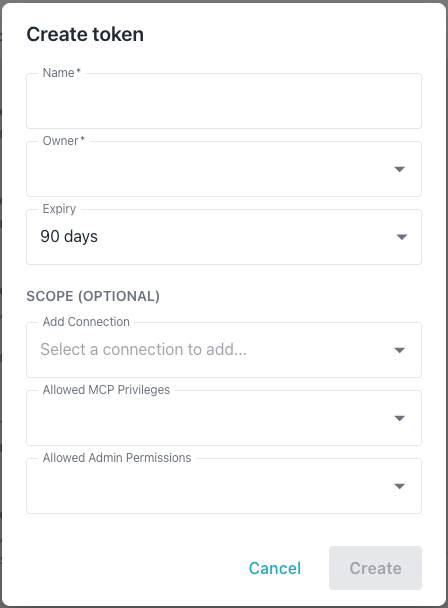
Provide the following information in the Create token dialog:
- The
Namefield sets the token annotation; use up to 255 characters. - Use the
Ownerdrop-down to select the user who owns the token; the token's effective access cannot exceed the owner's access. Only a superuser can create a token for another user; anyone else must select their own account. - The
Expirydrop-down sets the token lifetime; the choices are 30 days, 90 days, 1 year, or Never, defaulting to 90 days. - The
Add Connectiondrop-down adds a database connection to the token's scope; repeat this step to add multiple connections. The drop-down shows only connections the selected owner can access, and displaysNo optionswhen the owner has no connections assigned. After adding a connection, the access level defaults to the owner's maximum level for that connection; you can lower it toread. - The
Allowed MCP Privilegesdrop-down restricts the token to specific MCP tools; theAll MCP Privilegeswildcard grants every MCP privilege the owner holds. - The
Allowed Admin Permissionsdrop-down restricts the token to specific admin operations; theAll Admin Permissionswildcard grants every admin permission the owner holds.
The Create button is disabled until both the Name and Owner fields are
completed; select Create to create the described token.
Note
While allow_api_tokens is off, a user who signs in through an
identity provider cannot own a token. For such a user, the Tokens
page hides the + Create Token button and displays the message
"API tokens are disabled for federated logins in this installation.
Contact your system administrator." A superuser who signs in through
the provider keeps the button, but the Owner drop-down omits their
own account. See
API Tokens and Federated Users.
You can also create a token at the command line. In the following example, the
-add-token flag starts token creation in interactive mode, prompting you for
token details:
./bin/ai-dba-server -add-token
When prompted, provide the following:
- Owner username (required)
- Annotation or note (optional)
- Expiry duration (e.g.,
30d,1y,never)
The syntax used to create a token in non-interactive is the same for a user
account or a service account; specify token properties in key/value pairs when
invoking the -add-token command:
# Create token for a user
./bin/ai-dba-server -add-token \
  -user alice \
  -token-note "CI/CD Pipeline" \
  -token-expiry "90d"

# Create token for a service account
./bin/ai-dba-server -add-token \
  -user svc-bot \
  -token-note "Automation" \
  -token-expiry "never"
The -add-token command accepts the following expiry format strings:
30dspecifies 30 days.1yspecifies 1 year.2wspecifies 2 weeks.12hspecifies 12 hours.1mspecifies 1 month (30 days).neverspecifies that the token never expires.
The command displays the token upon creation:
===========================================================
Token created successfully!
===========================================================

Token: <generated-token-value>
Hash:  <token-hash>
ID:    1
Owner: alice
Note:  CI/CD Pipeline
Expires: 2025-01-28T10:15:30-05:00
===========================================================

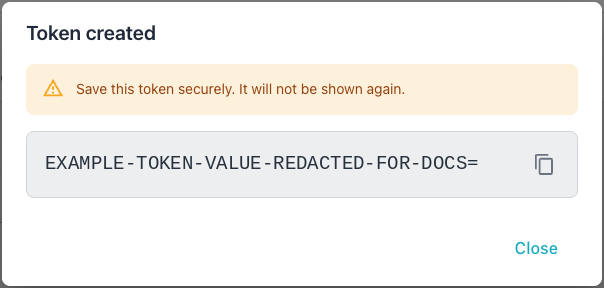
IMPORTANT: Save this token securely - it will not be
shown again! Use it in API requests with:
Authorization: Bearer <token>
===========================================================
Listing Tokens
You can review a list of tokens in either the Workbench console or at the command line.
Tokens appear on the Tokens tab in the Administration console:
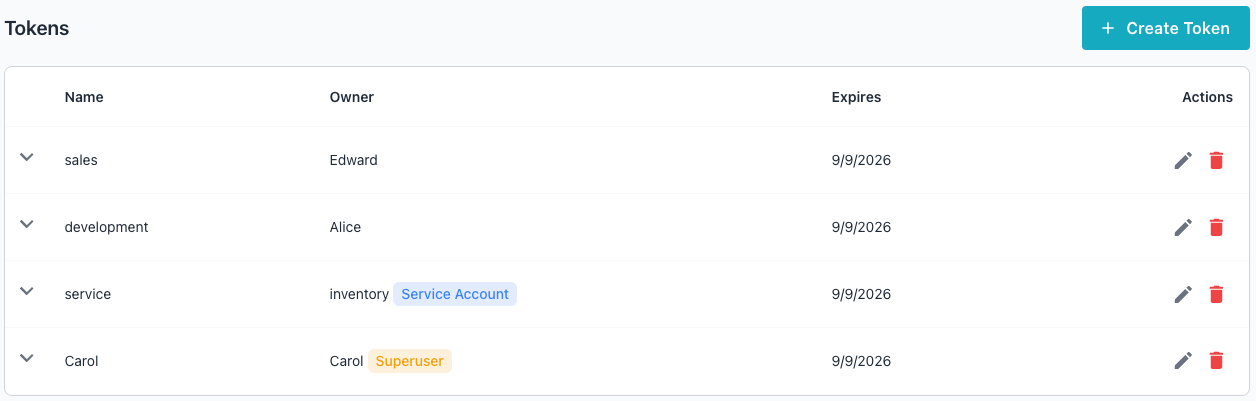
You can also display a list of tokens at the command line. In the following
example, the -list-tokens command displays a list of tokens:
./bin/ai-dba-server -list-tokens
The information displayed includes the token's ID, the hash prefix, the token owner, if the account is a superuser, if the account is a service account, the token expiration details, and current status:
Tokens:
======================================================================
ID   Hash Prefix        Owner     Super  Svc    Expires          Status
----------------------------------------------------------------------
1    <hash-prefix-1>    alice     No     No     2025-01-28 10:15 Active
2    <hash-prefix-2>    svc-bot   No     Yes    Never            Active
3    <hash-prefix-3>    bob       No     No     2024-10-15 14:20 EXPIRED
======================================================================
Removing Tokens
You can delete a token in the Workbench console's Tokens table or at the
command line. To delete a token in the console, select the Delete icon
(the garbage can) at the far-right of a token entry. A popup opens, asking
you to confirm that you wish to delete the token:
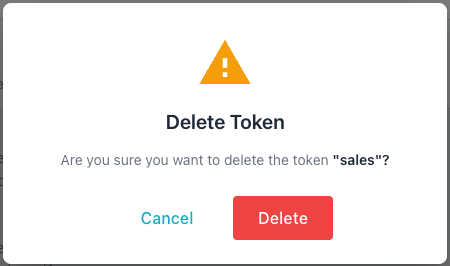
Select Delete to permanently delete the specified token.
You can also delete a token at the command line with the -remove-token
command and the token ID or hash prefix; in the following examples,
-remove-token deletes an API token by its ID and hash prefix:
# Remove by token ID
./bin/ai-dba-server -remove-token 1

# Remove by hash prefix (minimum 8 characters)
./bin/ai-dba-server -remove-token <hash-prefix>
The server records every token creation, deletion and scope change in the audit log, naming the user, token or command-line operator that made it; for details, see Audit Log.
Bounding What a Token Can Grant
The Workbench bounds every administrative change made with an API token by the token's own access. This section explains the intent behind that design, and then describes the rules the server applies to each kind of change.
Design Intent
A token's scope does two separate jobs. The connection scope limits which monitored servers, and so which data, the token can reach; the MCP privilege scope limits which tools the token can call. The admin permission scope limits which administrative actions the token can perform, such as granting privileges to a group or creating a user.
Taken alone, those two jobs leave a gap, because an administrative action can
hand out access to servers and an admin permission says nothing about which
servers. Without a further rule, a token holding manage_permissions could
grant a group access to a server that the token was deliberately blocked
from. If the token's owner belongs to that group, the grant widens the owner's
access, and with it every browser session and every token without a connection
scope that the owner holds; a token bounded by its owner's group grants rather
than by its own scope would widen itself. A group that a confederate belongs
to could serve the same purpose.
The Workbench closes the gap with a ceiling: a token acting as an administrator can grant only what it holds itself. The server judges the ceiling one connection and one access level at a time, and one MCP item and one admin permission at a time. A token's own access is its owner's privileges narrowed by its scope, so a token with no scope is bounded by its owner's privileges alone. Each grant must lie within the acting token's access, so no chain of grants, however long, can ever reach beyond what the token already holds. The design is secure by default; a token with no access to a server can neither give anyone access to that server nor confirm that the server exists.
An administrative request made with a token therefore passes two gates in turn. The admin permission decides whether the token may perform the action at all, and the ceiling then decides whether the access the action hands out lies within the token's own.
For example, an administrator might hold a token with the
manage_permissions admin permission and a connection scope that names only
the Finance servers at read_write. The administrator can use the token to
grant a group read or read_write access to any Finance server, and to
revoke such access. The token cannot grant any group access to the HR
servers, cannot grant the All Connections entry, and cannot add a user to a
group that reaches the HR servers.
The ceiling applies to API tokens only. A user working in a browser session
carries no token scope, so the user's admin permissions alone bound what the
user can grant. The server refuses a request that exceeds the ceiling with
403 Forbidden and records the refusal in the RBAC audit log. Each error
message is fixed text that says what exceeded the token's access, so a
refusal never names a connection or other object the token cannot see.
Several rules below need a token that holds everything a superuser does. Such
a token belongs to a superuser; its connection scope is unset or holds the
All Connections entry at read_write, and its MCP privilege and admin
permission scopes are each unset or hold their wildcard.
Granting and Revoking Connection Access
A token can grant or revoke a group's access to a connection according to the token's own access to that connection.
The following table shows what a token can do to a group's grant on a single connection, by the token's own access level on that connection:
| Token's access to the connection | Can grant | Can revoke |
|---|---|---|
| No access | Nothing | Nothing |
read |
read only |
Any grant except the connection's last |
read_write |
read or read_write |
Any grant |
Revoking a grant needs only read access, because narrowing access never
expands anyone's reach. Requiring read keeps unseen servers hidden; the
server refuses a revoke on a connection the token cannot read in the same
words as a revoke on a connection that does not exist.
Revoking the last group grant on a connection is stricter, and needs
read_write access to that connection. Only a grant that names the
connection counts; an All Connections grant restricts no connection, so
revoking one never needs more than read. A connection with no group grant
is no longer restricted to groups, so a shared connection becomes open to every
user; removing the last grant therefore needs the access that granting
read_write to every user would need. The server applies this rule to the
last grant on any connection, shared or not. The server decides whether a
revoke or a group deletion removes a connection's last grant inside the same
transaction as the change, so a concurrent change cannot let a token lift a
restriction that the token could not lift on its own.
Granting the All Connections entry at an access level needs the token to
hold every connection, present and future, at that level. That access comes
from the owner's own All Connections grant, which a superuser holds at
read_write, narrowed by the token's own All Connections scope entry. A
token whose scope names particular connections never qualifies, even when the
scope names every connection that exists today.
Removing a member from a group takes away the connections membership confers,
including those the group inherits from groups it belongs to. The token
therefore needs at least read access to each of those connections, as for a
revoke. Deleting a group needs the same, and also needs read_write access
to each connection on which the group holds the last grant.
The same rules apply to a group's All Connections grant, judged against
every connection. Revoking that grant needs the token to hold every
connection at read, and never needs read_write, because an
All Connections grant restricts no connection.
Granting MCP Privileges and Admin Permissions
The ceiling covers MCP privileges and admin permissions in the same way as connections: a token can grant only what lies within its own scope.
A token can grant a group an MCP privilege only when the token can call that
MCP item itself. The * wildcard needs a token that reaches every MCP item,
present and future, which means that the owner holds the wildcard, or is a
superuser, and that the token's MCP privilege scope is unrestricted.
Only a superuser can manage a group's admin permissions, and a superuser's
token counts only when its admin permission scope is unset or holds the *
wildcard. Such a token already holds every admin permission, so the ceiling
adds a connection requirement; the token must hold every connection at
read_write, because an admin permission acts across the whole estate
rather than on particular servers.
Granting manage_users, manage_groups, manage_permissions,
manage_token_scopes or the * wildcard is stricter still; the token must
also reach every MCP item, so its MCP privilege scope must be unset or hold
the wildcard. Each of those permissions lets its holder acquire everything
else:
manage_userslets a holder take over any account by setting its password.manage_groupslets a holder join any group.manage_permissionslets a holder grant any MCP item or admin permission to a group the holder belongs to.manage_token_scopeslets a holder create tokens and change token scopes; the server keeps counting it among the permissions that lead to everything else, as it did when a holder could widen any token.
A member of the group who signs in with a browser session is not bounded by
any token. Without the stricter rule, a token restricted in its MCP privilege
scope could grant manage_permissions to a group, and a member's session
could then grant the MCP items that the token itself was refused.
Revoking an MCP privilege or an admin permission from a group narrows access, so the ceiling places no requirement on either revoke.
Changing Group Membership and Group Names
Adding a user or a group to a group grants everything that membership
confers, so the ceiling judges the group's whole set of access. The token can
add a member only when the group's connections, MCP privileges and admin
permissions, including everything inherited from the groups it belongs to, lie
within the token's access. A group holding any admin permission counts as
reaching every connection at read_write, as the
Counting a User's Access section describes.
The ceiling also covers group names. Renaming a group whose access reaches
beyond the token's is refused, unless the token holds everything a superuser
does. Federated sign-in matches groups by the names in the OIDC group_map,
so creating a group with such a name, renaming a group from or to such a
name, or deleting such a group needs a token that holds everything a
superuser does. The check reads group_map as it stands after the most
recent configuration reload, so a newly mapped group is protected at once.
A group that a reload removes from group_map loses this protection at once,
so a bounded token can then rename or delete it within the rest of the
ceiling, even though its
federated members keep their membership as Single Sign-On
describes; remap the group rather than removing it to keep the protection.
Changing Users and Tokens
The ceiling covers changes that hand a user access indirectly, as well as direct grants. A token is refused when it tries to:
- create a user who would reach beyond the token's access; a user in no group still reaches every shared connection that no group restricts, every connection the username already owns and every public MCP item.
- create a superuser or make an existing user a superuser, unless the token holds everything a superuser does.
- set the password of, or re-enable, a user whose access reaches beyond the token's, because either change hands the token's holder that account.
- delete a user whose access reaches beyond the token's, because connection ownership is recorded by username and passes to whoever recreates the account.
- create a token for an owner whose access reaches beyond the token's, because a new token starts with no scope and acts with its owner's whole access; a token for a superuser therefore needs a token that holds everything a superuser does.
- change another token's scope so that the other token gains access beyond the acting token's.
A scope change is judged one entry at a time. An entry that grants the target
token more than its current scope allows must lie within the acting token's
access. Every connection entry that the new scope names or drops needs at
least read access to that connection, as a revoke does. Narrowing an MCP
privilege or admin permission scope needs nothing, and a token holding
everything a superuser does may make any change. The same rules apply when a
token changes its own scope, so a token can narrow itself but can never widen
itself.
Clearing a token's scope gives the token its owner's whole access. For each
scope type that the token restricts today, the owner's whole access of that
type must lie within the acting token's access, and each connection entry the
clear drops needs at least read access.
A token that a superuser owns is bounded by its scope alone, so widening its scope hands out superuser access. The ceiling refuses any change that widens a superuser's token, whether the change raises a connection entry above the level the token allows today or adds an MCP item or admin permission to a restricted scope type, unless the acting token holds everything a superuser does. Clearing the scope of a superuser's token that is restricted in any scope type widens the token in the same way, and needs the same.
Setting or clearing the scope of a superuser's token, or deleting one, also requires a superuser's session or a superuser's token with an unrestricted admin permission scope; a token acting on itself is exempt from that requirement. The server makes this check after the ceiling, when it writes the change, and reads the token's owner in the same transaction as the write, so a token whose owner becomes a superuser whilst the request is in progress is still protected.
Counting a User's Access
The checks on users and token owners compare everything the user can reach with the token's access.
A user's access, for these checks, counts the user's group grants, every
public MCP item, every shared connection that no group restricts, every
connection that the user's name owns, and every member connection of each
cluster group the user's name owns. Owned connections and cluster group
members count at read_write, whether or not a connection is shared and
whether or not a group restricts it, since an owner can always edit or delete
what they own. A user or group holding any admin permission counts as
reaching every connection at read_write, because an admin permission acts
across the whole estate. A user or group holding the manage_users,
manage_groups, manage_permissions or manage_token_scopes admin
permission counts as reaching every MCP item and every admin permission,
because each of those lets its holder acquire the rest. A token whose MCP
scope lists only items that have since been deleted is treated as restricted
to no MCP items at all.
Accepted Trade-Off and Known Limits
The ceiling stops a token widening anyone's access, but the ceiling does not stop a token removing access or changing accounts in other ways.
Revoking needs only read access, so a token holding the
manage_permissions admin permission and read access to a connection can
revoke another group's read_write grant on that connection, provided
another grant on the connection remains. This is an accepted trade-off; the
revoke cannot escalate anyone's access, but the revoke can disrupt the work of
other users.
The following actions are not bounded by the ceiling at all. Whatever its connection or MCP scope, a token holding the relevant admin permission can:
- revoke any group's MCP privileges or admin permissions.
- remove a member from a group whose MCP privileges or admin permissions lie outside the token's access, provided the token can read the group's connections.
- change any user's display name, email address or annotation, or disable any user, including a superuser when the token belongs to a superuser and its admin permission scope is unrestricted; a token can never disable the last enabled superuser.
- clear a user's superuser status, when the token belongs to a superuser and its admin permission scope is unrestricted, unless the user is the last enabled superuser.
- delete any token that a superuser does not own; deleting a token that a superuser owns needs a superuser's session, or a superuser's token with an unrestricted admin permission scope, unless the token deletes itself.
Issue a token with those admin permissions only to a holder you would trust with such changes across the whole estate.