Configuring Webhook Channels
Webhook channels deliver alert notifications to an HTTP endpoint on a public address. The webhook channel offers the most flexibility through configurable HTTP methods, custom headers, authentication options, and JSON payload templates. The alerter refuses to deliver to an endpoint whose host resolves to a private or internal address, such as an RFC 1918, loopback, link-local, or carrier-grade NAT address, so a webhook cannot reach a service on an internal network. Managing Notification Channels describes the operations that every channel type shares, such as creating, testing, and enabling a channel.
Creating a Webhook Channel
Use the following steps to create a webhook channel in the Workbench:
- Open the
Administrationconsole, and selectWebhook Channelsin theNOTIFICATIONSsection of the navigation pane. - Select
Add Channelto open theCreate webhook channeldialog. - On the
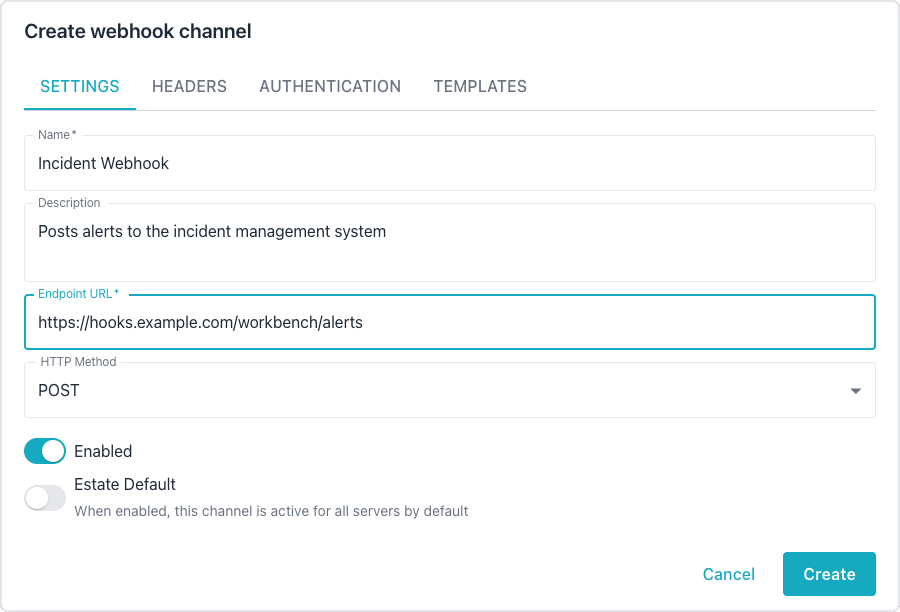
SETTINGStab, enter a name for the channel, the endpoint URL, and the HTTP method, as described in Settings Tab. - Optionally, add custom HTTP headers on the
HEADERStab, choose an authentication type on theAUTHENTICATIONtab, and customize the JSON payloads on theTEMPLATEStab. - Select
Createto save the channel. - Select the send icon (tooltip
Send test notification) in the channel's row to send a test notification and confirm the configuration.
To change a channel later, select the edit icon in the channel's row on the
Webhook Channels page; the edit dialog has the same tabs.
Settings Tab
The Settings tab configures the core webhook properties:
| Setting | Required | Default | Description |
|---|---|---|---|
| Name | Yes | - | A descriptive name for the channel. |
| Description | No | - | An optional description. |
| Endpoint URL | Yes | - | The URL to send notifications to. |
| HTTP Method | No | POST | The HTTP method: POST, GET, PUT, or PATCH. |
| Enabled | No | On | Toggles the channel on or off. |
A GET request carries no request body, and the alerter does not add the
alert data to the URL, so an endpoint called with GET receives no alert
payload. Use POST, PUT, or PATCH when the endpoint needs the alert
details.
The Endpoint URL must be the final URL that handles the request, because the alerter does not follow redirects; see Handling HTTP Redirects.
Headers Tab
The Headers tab manages custom HTTP headers as key-value pairs. Administrators can add or remove headers dynamically to meet the requirements of the target endpoint.
Authentication Tab
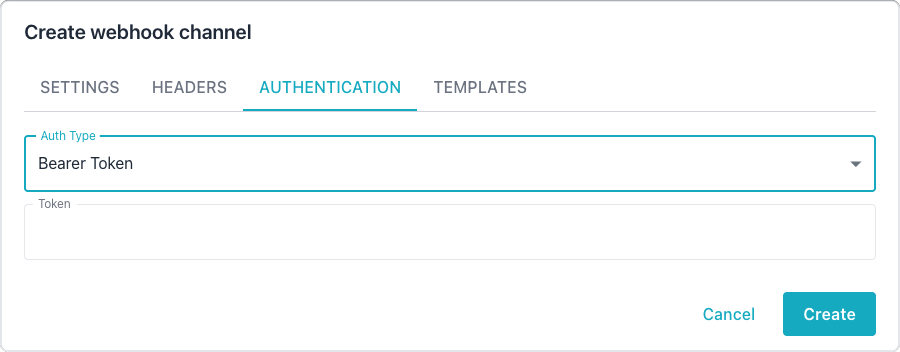
The Authentication tab configures credentials for the target endpoint. The following authentication types are available:
| Auth Type | Fields | Description |
|---|---|---|
| None | - | The request sends no authentication. |
| Basic | Username, Password | The request uses HTTP Basic authentication. |
| Bearer Token | Token | The request includes a Bearer token header. |
| API Key | Header Name, Key | The request sends the key in a custom header. |
For the API Key type, specify the header name (such as X-API-Key) and the
corresponding key value.
Templates Tab
Webhook channels support customizable JSON payload templates using Go
text/template syntax. For template syntax details, see the
Go template documentation.
The Templates tab provides three template editors:
- The Alert Fire template formats the payload when an alert triggers.
- The Alert Clear template formats the payload when an alert resolves.
- The Reminder template formats the payload for recurring alert reminders.
If left blank, the system uses sensible default templates for each notification type.
Template Variables
Templates have access to the following context variables:
| Variable | Type | Description |
|---|---|---|
AlertID |
integer | The unique alert identifier. |
AlertTitle |
string | The alert rule name. |
AlertDescription |
string | A detailed description of the alert. |
Severity |
string | The severity level: critical, warning, or info. |
SeverityColor |
string | A hex color for the severity. |
SeverityEmoji |
string | An emoji for the severity level. |
Status |
string | The current alert status. |
ServerName |
string | The friendly name of the monitored server. |
ServerHost |
string | The hostname of the monitored server. |
ServerPort |
integer | The port number of the monitored server. |
DatabaseName |
string | The database name; may be empty. |
MetricName |
string | The name of the metric that triggered the alert; may be empty. |
MetricValue |
float | The current metric value; may be empty. |
ThresholdValue |
float | The threshold that was crossed; may be empty. |
Operator |
string | The comparison operator (such as >, <, or =). |
TriggeredAt |
time | The timestamp when the alert fired. |
ClearedAt |
time | The timestamp when the alert cleared; may be empty. |
Duration |
string | A human-readable duration the alert was active. |
Timestamp |
time | The timestamp when the notification was created. |
ReminderCount |
integer | The reminder sequence number. |
NotificationType |
string | The notification type: alert_fire, alert_clear, or reminder. |
ConnectionID |
integer | The internal connection identifier. |
Optional fields such as DatabaseName, MetricName, MetricValue,
ThresholdValue, Operator, and ClearedAt should use
{{if .FieldName}}...{{end}} conditionals in templates to handle empty values.
A system alert, which reports a fault in the Workbench itself, belongs to no
monitored server. A system alert notification carries
AI DBA Workbench alerter as the ServerName, the host running the alerter
as the ServerHost, 0 as the ServerPort, and 0 as the ConnectionID.
System alert notifications go to the estate default channels only, since
channel overrides apply to a server, cluster, or group.
Time fields support formatting with the Go time layout syntax. In the following
example, the TriggeredAt field uses ISO 8601 format:
{{.TriggeredAt.Format "2006-01-02T15:04:05Z07:00"}}
Default Templates
The system provides default templates for each notification type. Administrators can copy and customize these templates.
The following template handles alert fire notifications:
{
  "event": "alert_fire",
  "alert_id": {{.AlertID}},
  "title": "{{.AlertTitle}}",
  "description": "{{.AlertDescription}}",
  "severity": "{{.Severity}}",
  "server": {
    "name": "{{.ServerName}}",
    "host": "{{.ServerHost}}",
    "port": {{.ServerPort}}
  },
  {{- if .DatabaseName}}
  "database": "{{.DatabaseName}}",
  {{- end}}
  {{- if .MetricName}}
  "metric": {
    "name": "{{.MetricName}}"
    {{- if .MetricValue}},
      "value": {{.MetricValue}}
    {{- end}}
    {{- if .ThresholdValue}},
      "threshold": {{.ThresholdValue}}
    {{- end}}
    {{- if .Operator}},
      "operator": "{{.Operator}}"
    {{- end}}
  },
  {{- end}}
  "triggered_at":
    "{{.TriggeredAt.Format "2006-01-02T15:04:05Z07:00"}}"
}
The following template handles alert clear notifications:
{
  "event": "alert_clear",
  "alert_id": {{.AlertID}},
  "title": "{{.AlertTitle}}",
  "server": {
    "name": "{{.ServerName}}",
    "host": "{{.ServerHost}}",
    "port": {{.ServerPort}}
  },
  "triggered_at":
    "{{.TriggeredAt.Format "2006-01-02T15:04:05Z07:00"}}"
  {{- if .ClearedAt}},
  "cleared_at":
    "{{.ClearedAt.Format "2006-01-02T15:04:05Z07:00"}}"
  {{- end}},
  "duration": "{{.Duration}}"
}
The following template handles reminder notifications:
{
  "event": "reminder",
  "alert_id": {{.AlertID}},
  "title": "{{.AlertTitle}}",
  "description": "{{.AlertDescription}}",
  "severity": "{{.Severity}}",
  "server": {
    "name": "{{.ServerName}}",
    "host": "{{.ServerHost}}",
    "port": {{.ServerPort}}
  },
  "triggered_at":
    "{{.TriggeredAt.Format "2006-01-02T15:04:05Z07:00"}}",
  "reminder_count": {{.ReminderCount}}
}