Reviewing the Log Files
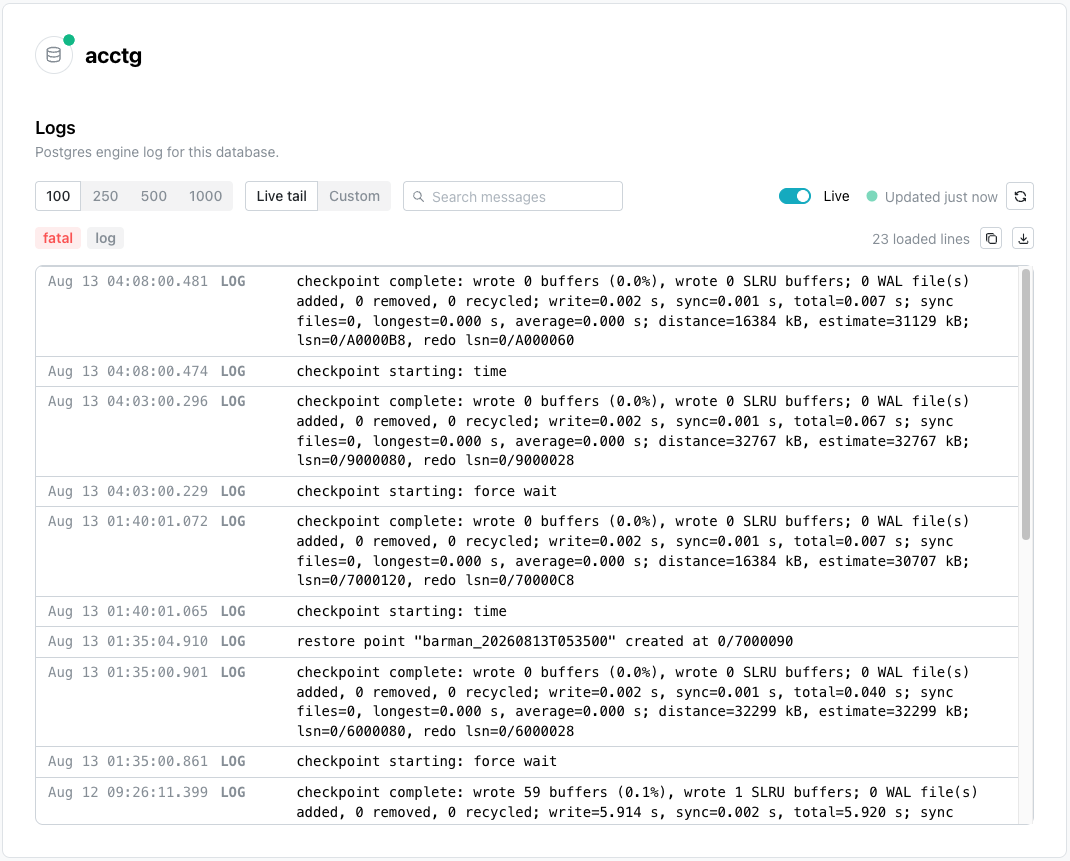
The Logs page displays the Postgres engine log for your database or
branch, with the newest line at the top; each entry displays the
timestamp, log level (for example, LOG), and message.
The page provides the following controls:
- the
100,250,500, and1000buttons control how many of the newest log lines load. Live tailfollows new log entries as they arrive, fetching new lines every 8 seconds;Customspecifies a fixed time range instead.- the
Search messagesfield filters entries by keyword. Livetoggles automatic updates on or off, and is disabled while aCustomrange is applied.- a severity button (for example,
logorfatal) filters entries by level. - the copy and download icons (in the upper-right corner of the log table) copy or download the lines currently displayed.
Hint
The severity buttons and the Search messages field filter the lines
already loaded rather than fetching more, so raise the line count to reach
older entries. If new lines arrive while you are scrolled away from the
top, a button appears counting them, and selecting it returns you to the
newest line. Load older lines, at the foot of the table, extends the
loaded history until the page reads End of the loaded history.
Troubleshooting
-
Couldn't load logsmeans the read failed. Select theRetrybutton; if the error repeats, narrow the time range or lower the line count. -
No logs in this windowmeans the read succeeded and the window held no lines. Raise the line count, or widen a custom range. A quiet database writes few engine log lines. -
No lines match the current filtermeans lines loaded, but the severity buttons or the search box excluded all of them. Clear the filter. Filters apply only to the lines already loaded, so raise the line count to reach further back rather than expecting a filter to fetch more. -
Could not copy the log lines to your clipboardappears when the copy icon cannot reach the clipboard. The cause is a browser-permission or non-secure-context issue, rather than anything about the database. Use the download icon instead, which writes the same lines to a text file.